API & MCP
Let your AI assistant or your own code work with AtSocials. It can list channels, publish, schedule, queue and delete posts, find the next free posting slots, read the calendar and read your analytics. API access is included on every plan.
Open it from the account menu → API & MCP (owners and admins).
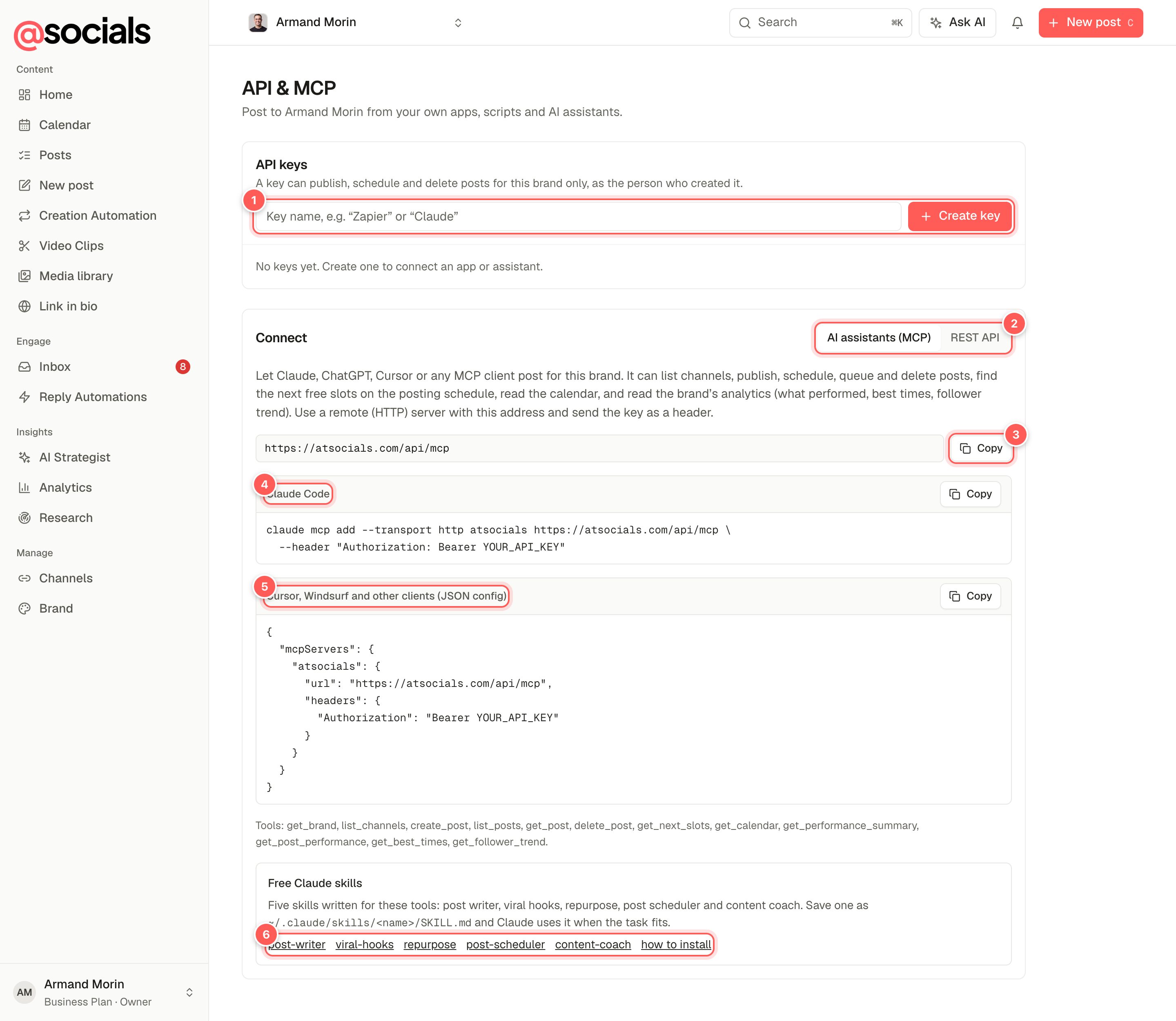
- API keys. Name the key after where you'll use it (Claude, Zapier) and click Create key.
- AI assistants (MCP) / REST API: setup instructions for each.
- Server address with a copy button.
- Claude Code: a ready-to-paste command.
- Cursor, Windsurf and other clients: a JSON config.
- Free Claude skills written for AtSocials, with install instructions.
API keys
- A key works for one brand only: the brand you're on when you create it.
- It acts as you. If you lose write access to the brand, the key stops working.
- Copy the key when it's shown: you won't be able to see it again. AtSocials only stores a fingerprint of it.
- Revoke a key at any time from the list. Anything using it stops immediately.
Connect an AI assistant (MCP)
MCP lets assistants such as Claude, ChatGPT and Cursor use AtSocials as a tool. Add a remote (HTTP) server with this address and send your key as a header:
https://atsocials.com/api/mcp
Authorization: Bearer YOUR_API_KEY
In Claude Code:
claude mcp add --transport http atsocials https://atsocials.com/api/mcp \
  --header "Authorization: Bearer YOUR_API_KEY"
In Cursor, Windsurf and other clients that use a JSON config:
{
  "mcpServers": {
    "atsocials": {
      "url": "https://atsocials.com/api/mcp",
      "headers": { "Authorization": "Bearer YOUR_API_KEY" }
    }
  }
}
Then ask in plain words, for example "Schedule a LinkedIn post for Tuesday at 9am about our new feature" or "What were my best posts last month?"
| Tool | What it does |
|---|---|
get_brand, list_channels | The brand, its timezone and its connected channels |
create_post | Publish now, schedule, add to the queue or save a draft |
list_posts, get_post, delete_post | Find, check and delete posts |
get_next_slots | The next free times on your posting schedule |
get_calendar | What's planned for the coming days |
get_performance_summary, get_post_performance, get_best_times, get_follower_trend | Your analytics: headline numbers, what performed, best times and follower growth |
REST API
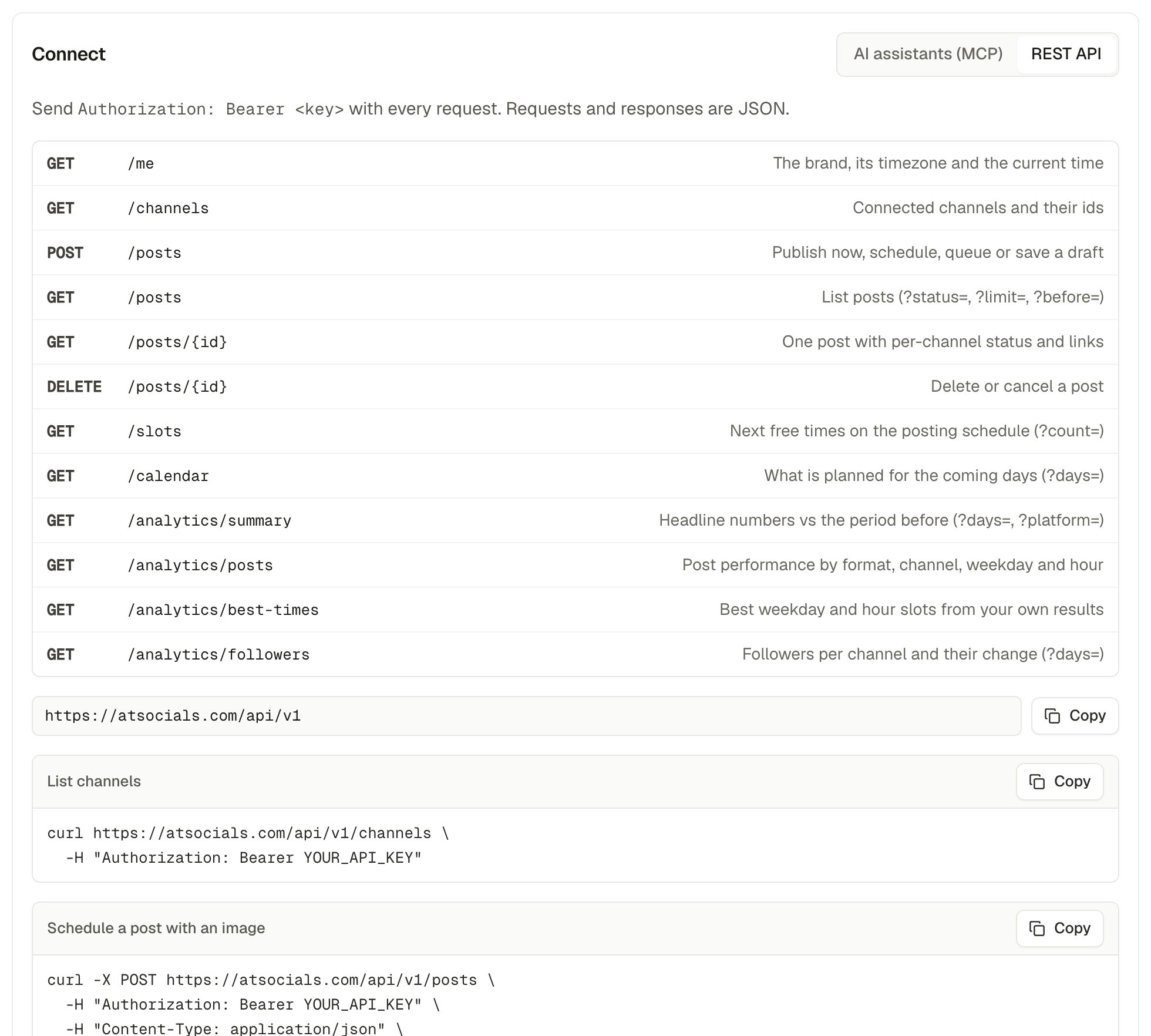
The base address is https://atsocials.com/api/v1. Send Authorization: Bearer YOUR_API_KEY with every request; requests and responses are JSON.
curl -X POST https://atsocials.com/api/v1/posts \
  -H "Authorization: Bearer YOUR_API_KEY" \
  -H "Content-Type: application/json" \
-d '{"content": "Hello from the API", "channels": "all", "addToQueue": true}'| Endpoint | What it does |
|---|---|
GET /me | The brand, its timezone and the current time |
GET /channels | Connected channels and their ids |
POST /posts | Publish now, schedule (scheduledFor), queue (addToQueue) or save a draft. Attach media by URL with media. |
GET /posts, GET /posts/{id} | List posts, or one post with each channel's status and link |
DELETE /posts/{id} | Delete or cancel a post |
GET /slots | Next free times on the posting schedule |
GET /calendar | What's planned for the coming days |
GET /analytics/summary, /posts, /best-times, /followers | Analytics (needs the analytics feature on your plan) |
Use "channels": "all" for every active channel, or a list of channel ids from GET /channels. Paused channels are skipped for all and refused by id.
Claude skills
Free skills that teach Claude to work with AtSocials well: post-writer, viral-hooks, repurpose, post-scheduler and content-coach. Find them, with install steps, at atsocials.com/skills.